How is using Sunday Ready different than using AI for sermon preparation?

If you’re considering Sunday Ready, you’ve probably wondered, “Couldn’t I just use ChatGPT?” “Why would I pay for Sunday Ready when ChatGPT is $20/month?”

It’s a fair question. Let me state right up front: I’m not anti-AI. I definitely have some real concerns about what the future of creativity and deep work looks like 5-10 years from now, but it’s an incredible tool for brainstorming, organizing ideas, summarizing information, and speeding up tasks that used to take hours.

According to the 2025 State of AI in the Church Survey, nearly two-thirds of pastors now use AI weekly or daily in some part of their ministry, and 61% report using it every week or every day. That number is only going to grow moving forward.

Ironically, Sunday Ready has grown significantly since AI became mainstream. So this article isn’t a defense against AI, but rather an explanation of the differences between using AI and Sunday Ready.

Sunday Ready isn’t the right fit for every pastor. You can accomplish a lot with AI alone. But for pastors who want a partner to help carry the pressure of weekly preaching, we believe there’s tremendous value in collaboration.

Our process differs from using ChatGPT or Claude in several ways, but the first and most important way is that…

1. Our Process is Human.

If I had to guess how the average pastor uses ChatGPT, it probably goes something like this: “Give me a scripture and 3 points about prayer.” In other words, you’re asking ChatGPT to come to all the conclusions for you.

That is efficient, and the sermon outline is probably even pretty solid. But we’re not trying to be efficient. We’re trying to be prayerful and creative. AI bypasses the entire creative and discerning part of the sermon preparation process.

At Sunday Ready, we prefer to talk it out. Before we ever write a word, we spend at least an hour talking. Sometimes we’re talking theology. Other times we’re wrestling through structure. Sometimes we’re talking about what’s happening in your church, and oftentimes we’re trying to think of a 3rd point that starts with the letter “P” (you know, preachers love their alliterations).

We don’t just want to write a sermon—we want to write a sermon together. Yes, we’ll manage the heavy lifting and type up a first draft, but before any of that, we want to give the Spirit of God the chance to speak through multiple voices.

2. We source and verify our research

If you’ve ever asked ChatGPT for a stat, quote, or story, you may have discovered that the results weren’t accurate.  One of AI’s greatest strengths is also one of its greatest weaknesses. It can produce an answer in seconds. The problem is, it can also produce a convincing answer that’s completely wrong.

Researchers call this hallucination—when an AI confidently generates information that isn’t true or can’t be traced back to a reliable source.

This is especially dangerous when you’re looking for sermon illustrations. If you’ve ever asked ChatGPT, “Give me a true story for the end of my sermon about perseverance,” and it gave you back an incredible story about Abraham Lincoln, it may have even given you a quote from a speech or a journal entry. There’s a high probability that parts of the story were completely fabricated.

If you follow up and ask ChatGPT, “Where can I find a source for this story or this quote?” it will respond back with something like, “That’s a great question, and it’s good for you to verify this information. There is no credible source for this story or quote, but it sounds like the sort of thing Abraham Lincoln would’ve written in his journal based on his other writings.”

It’s doing exactly what it was designed to do—predict the next most likely words based on patterns it has learned. No matter how many times you tell it to give you only true stories, stats, or sourced quotes, it will consistently provide what it thinks you want to hear, even if it is untrue.

We take our sources seriously at Sunday Ready and make sure to source and verify them so you can be confident you’re saying something that’s true. If it’s in your notes, one of our writers has verified the source firsthand.

I can say a lot more about that, but let me give you one more difference…

3. AI makes you sound like everyone else.

I always get pushback when I say this, but AI does not know your voice. I know, I know, you uploaded 20 sermons and told it to learn your voice. And it did, sort of. 

AI can absolutely learn your sentence length and can imitate your vocabulary, but it’s never going to only provide your voice. It’s also going to give you a consensus average of every other word in its database.

AI uses math to predict what word should follow the previous word. Even when you ask it to “sound like you,” it predicts the next most likely word based on billions of examples it has already seen. You’re going to get a variation of the average collection of words on the internet. By definition, it will be… artificial.

I’m not suggesting that the way you preach has to be completely unique, but if it hasn’t happened to you yet, it will soon. You’ll be sitting in a meeting, at a graduation, or, even worse, in a church service, and the words being spoken will sound predictably familiar.

  • You’ll hear lists of three in a sentence (you feel defeated, discouraged, and desperate)
  • A comparison that starts with the negative (faith is not certainty—it’s confidence in uncertainty)
  • And finally, a definitive statement (and that changes everything!)

That’s when it dawns on you: this was written by ChatGPT. Once you start seeing it and hearing it, you’ll noticeit everywhere. The more you use AI, the less aware you are of how monotonous and predictable you sound.

Our goal at Sunday Ready is to keep your authentic voice front and center in your sermon. The easiest way we do that is by having conversations week after week. We pick up on your sense of humor, your tastes, your convictions, and your passions.

Let me give you one more difference…

4. AI never pushes back

You’ve probably noticed by now that AI is incredibly affirming. One of the characteristics of large language models is that they tend to be highly agreeable and validating. That’s one reason more and more are using ChatGPT for counseling

But when it comes to creative work, it’s important to have some resistance. I don’t mean that someone should argue with you, but I do think it’s helpful to say what’s in your head out loud and get honest feedback from another person.

Our video calls allow the pastor and the writer to build on ideas. It usually sounds like, “That’s good, but it made me think of something else. What about…” Or sometimes, it might be: “I’m not sure I’m following you yet.” Once trust develops between a pastor and a writer, honest feedback becomes one of the most valuable parts of the relationship.

But what about…

With all that being said, I fully admit that there are times when AI is a lifesaver. Let me give you a few ways I’ve found AI to be useful in the sermon preparation process without bypassing the prayerful discerning parts.

Analogies and Illustrations

I have had a lot of luck asking ChatGPT to help me think of real-life examples and analogies for the point I’m trying to make.

For example, if I’m preaching on prayer and I have most of my sermon done but I want to find a spot to connect with the congregation, I might ask ChatGPT, “Help me find a spot to give a vivid illustration or use a prop in this sermon?” It might respond, “What if you used a pair of noise-canceling headphones to explain the importance of practicing silence in your prayer life?” That’s helpful.

Aliterations

Like I mentioned above, there are some times we’re just absolutely stuck and can’t think of another word to match our other points. In those moments, it’s nice to ask ChatGPT, “I’m trying to say humble, but I need it to start with a B.”

Historical Context

You’ve got to be careful with this one because, as with stories, it can lead you astray. But sometimes, with a general prompt like “Tell me 10 historical or geographical facts to provide some context for this passage,” you’ll be surprised with some interesting and helpful results. But as always, if it feels like “that was EXACTLY what I was looking for,” be suspicious and verify.

The question isn’t whether pastors should use AI. Christianity has always evolved and even used new technology to build the church. But the better question is whether AI should replace creative thought and collaboration. We don’t think so. That’s why Sunday Ready will always be about partnering with pastors to manage the pressure of weekly preaching.

Where Great Sermon Ideas Come From

Where do great sermon ideas come from? The Bible, yes. Of course. But I mean even before that. Where does the seed of a thought that eventually grows into a sermon start?

Every pastor loves to be inspired. And when you have a great sermon idea, it makes planning and writing the sermon so much easier. That’s why finding, collecting, and organizing those ideas matters so much.

In this article, I want to show you a system I’ve used and tweaked for 20 years to help me find, collect, and retrieve great ideas. Without a system for gathering material, sermon prep always starts at zero—and starting at zero every week is exhausting. One of the best ways to lighten the load of weekly preaching is to build a system that helps you get ahead before you ever sit down to write. (I’ve written about the physical toll of weekly preaching in this article.)

I don’t claim to have the perfect system. But I do have a system that has worked for me for years. I used this approach when I was pastoring and preaching weekly. I still use it today in my work with Sunday Ready and as a ghostwriter. At any given time, I’m usually managing multiple sermon series, a few book projects, and several social media accounts. Staying organized and collecting great ideas is how I survive creatively.

I’ve borrowed several ideas from Ryan Holiday. Here is a video of his system. (he is talking to authors but it’s applicable to pastors, too.)

I should also say this upfront: I am not a naturally organized person.

My desk is usually a mess. I try to keep it clean, but it rarely stays that way. In a lot of ways, my desk looks like my brain. That’s exactly why I need a system outside my head to catch sermon ideas before they disappear.

IMG 4711 1024x768

Below, I’ll walk you through the step-by-step process I use to plan ahead, collect sermon ideas, and prepare sermons without the constant pressure of starting from scratch.

But before we get practical, here’s the most important thing I’ve learned: The best system is the one you’ll actually use.

My system isn’t perfect, but the reason I stick with it is because I’ve proven to myself that I’ll actually use it. There are countless productivity methods out there. I’ve tried many of them, but for some reason or another, they didn’t last. Don’t aim to build the best system. Build one you’ll return to week after week. Consistency beats perfection every time.

With that in mind, here’s how I do it.

Step 1: Read, Read, and Read Some More.

If I were helping you get organized and ahead, the first question I’d ask is: Where do you get your ideas?

In theory, you can find material from videos, podcasts, and social media. I use those too. But I honestly don’t know how someone who doesn’t read consistently finds fresh material over the long haul. Of course, this includes the Bible.

sermon ideas in books
My office in my last house. That bookshelf was my pride and joy.

The quote attributed to Mark Twain comes to mind: “The man who does not read has no advantage over the man who cannot read.”

I know you’re busy. Who has time to read? But the average person watches about 20 hours of television a week and spends nearly 5 hours a day on their phone. Maybe that’s not you. But most of us could find time to read. I have the benefit of actually enjoying it, but even if you don’t, I think it’s part of the job. If you want to say something meaningful, you have to take in something meaningful.

I read recently that when James Mattis served as Secretary of Defense, he blocked off an hour every day for “lunch/reading time.” Eugene Peterson did something similar. He literally scheduled reading and thinking into his calendar. He treated them as appointments, not optional extras.

Reading is rarely urgent. No one is emailing you demanding that you read a book today. That’s exactly why it gets pushed aside. But it’s also why it’s so crucial. Reading is one of the places where great sermon ideas come from.

Here’s a simple rule of thumb: Read more than you write.

So that’s step one: Read.

Step 2: Mark Anything Interesting

Always read with a pen. Underline sentences. Circle phrases. Write in the margins. There’s no right or wrong way to do this. Just make notes. 

I like to write the topic or project beside what I underline, so when I go through the book later (we’ll get to that in a moment), I know what I want to do with it. 

I also write down anything else that comes to mind, whether it has anything to do with what I read or not. If it sparked a thought, I write it in the book. That will be important later.

sermon ideas in books

Step 3: Review Your Notes For Great Sermon Ideas

At some point, after I finish reading the book, I flip through the book page by page and review all of the notes I made. 

As I review, I’m trying to refresh my memory and decide if what I found interesting is useful. If the note is still relevant, I make any additional notes I need and then fold down the corner of the page so I know where to find it later.

It’s worth noting that I don’t review my notes as soon as I finish reading the book. Often, I’ll go weeks without blocking off time to review the recent books I’ve read. As long as you’ve made notes while reading, it doesn’t really matter when you review them.

sermon ideas

Step 4: Make a Table of Contents

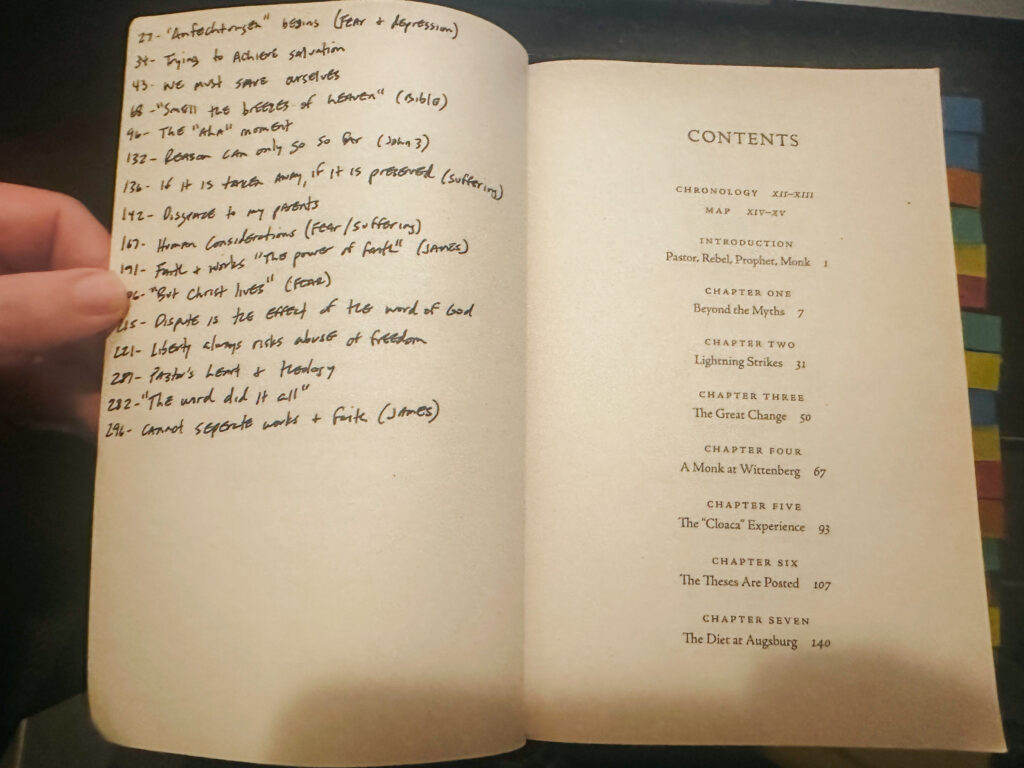
After you have reviewed your notes, find a blank page in the front of the book and write a simple description and page number where you can find it. 

It doesn’t seem important now, but in a few years, you’re going to think to yourself, “Where was that story I read about…” You’ll have a few guesses about where it was. When you go searching, having a Table of Contents makes the task of finding it much simpler and faster. It takes a little longer on the front end, but saves a lot of time on the back end. (I also add tabs to the pages, but that’s just a personal preference.)

sermon ideas in books

So if you’re keeping track, I go through each book three times:

First, I read it.
Second, I review my notes.
Third, I catalog what’s worth keeping.

Step 5: Move the Notes Where They Need To Go

This is where a lot of people lose track of their ideas. At some point, you have to move the notes from the book to the place where you want to use them.

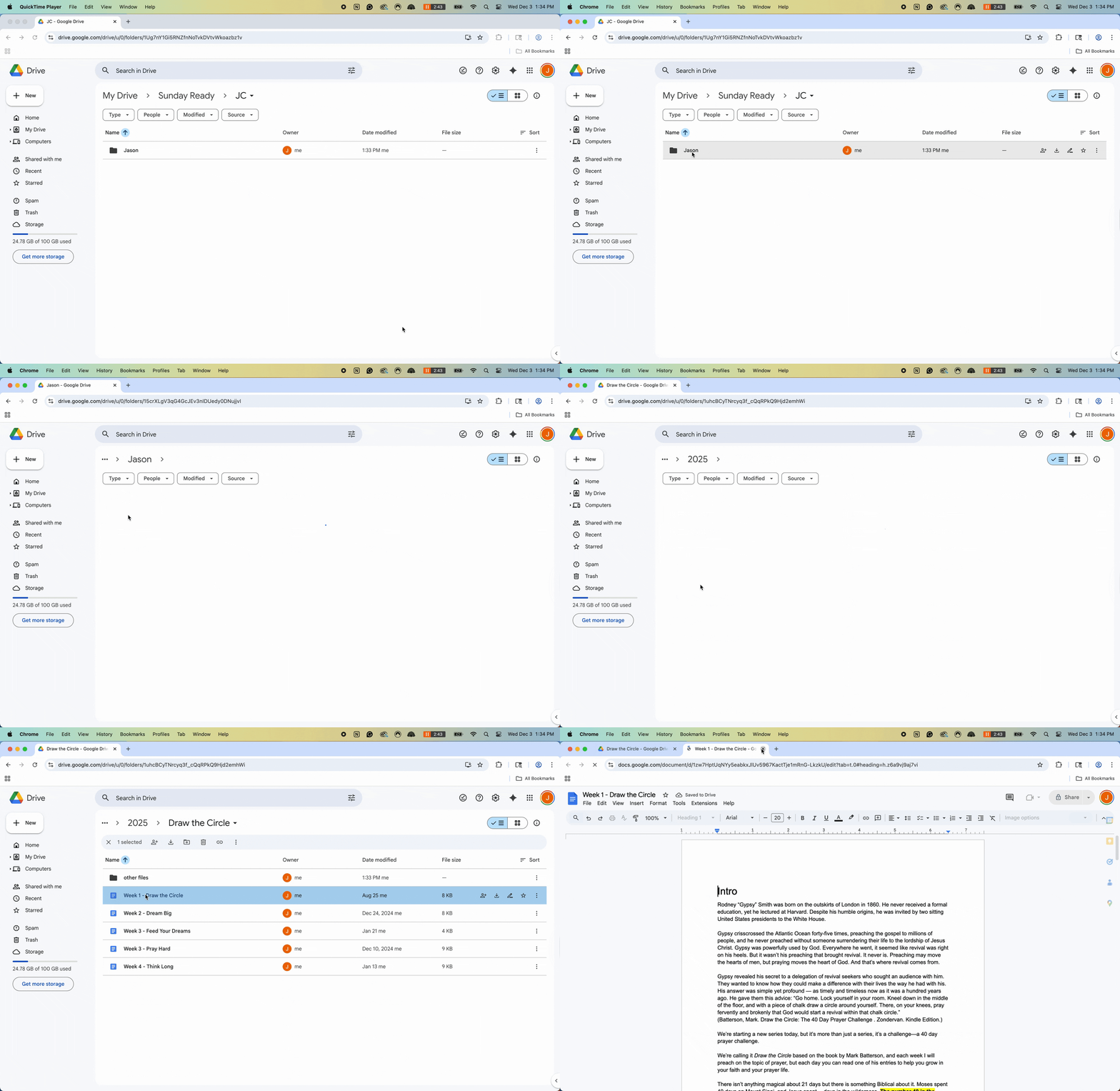
As I mentioned earlier, at any given time, I’m usually juggling several sermon series, a few book projects, and multiple social media streams. That only works because I have a very clear file-storage system.

I use Google Drive, and my setup is really simple.

Level 1 is my different businesses.
Level 2 is the projects I’m working on.
Levels 3 and 4 are a breakdown of those projects (series weeks or book chapters). 

This is where the magic happens.

Google Screen Recording

Because I plan ahead, using a preaching calendar and outlining book projects before I begin, I already have folders for future work. That means when I read something interesting, mark it, and review it, the final step is simple: I move that note into the exact project where I’ll eventually use it.

Sometimes I use the note exactly as I found it. If it’s a quote, I’ll paste it in and source it immediately so I won’t have to hunt it down later. Other times, the note just sparks a sermon idea or sends me in a new direction. Either way, it goes where future-me will need it. In this way, I create a sort of time travel machine. I go into the future and leave a note for myself. And then at just the right time, I find it when I need it. This means I am never ever starting from zero.

One important clarification: I do not keep one massive folder or database with all my material. I know many people use apps like Notion or Evernote. I’ve tried that. It never worked for me. My material only exists in the place where I plan to use it. That approach only works, though, because I know what I’m working on now, and what I’ll be working on later. Planning ahead is what makes this possible.

If you don’t know what you’re preaching three months from now, how would you know what to look for? And if you find something helpful, how would you know where to put it? A preaching plan gives your ideas a home. It allows you to collect and then know exactly where each piece belongs when the time comes.

I wrote a lot more on how to create a preaching plan in this article.

So that’s my system for finding, collecting, and using great sermon ideas in books. But what about ideas that don’t come from books? I have a system for that too….

Step 6: Write Down Every Idea

There’s nothing more frustrating than having a great sermon idea, and then losing it because you didn’t capture it in time.

Hemingway is often attributed with saying, “When you have an idea, you must write it down immediately, or it will escape.” He’s right. Ideas disappear.

That’s why I type everything that comes to my mind, and I mean literally everything that crosses my mind that I might want later, into my phone. Sentences for a book. A sermon angle. A domain name. A research question. A half-formed thought that doesn’t make sense yet. All of it goes in Apple Notes.

There are no rules. No categories. No pressure to organize it in the moment. Just get it out of your head and into the note. If I don’t type when I think about it, it’s gone.

Step 7: Review Your Notes and Move Them

Then, every few days or weeks, just like I review my book notes, I review my phone notes. After some time, what I typed may no longer be relevant, so I delete it. If it’s still relevant, I move that note to wherever I need to use it. (Which is usually in that Google Drive folder system I mentioned above)

If it stays in my phone too long, it gets lost because I’m always adding notes, and the scroll keeps getting longer and longer. I try to organize my notes every Friday. Sometimes I do, sometimes I don’t.

But what about something you see on YouTube or social media? I have a system for that too…

Step 8: Bookmark Everything

If you’re like me, you’re scrolling through social media and something jumps out at you—a quote, a story, a stat, or a turn of phrase. You think, “That’s a great sermon idea.” But if you don’t do something with it right then, it’s gone.

So I bookmark it into one of any different bookmark folders I created on the app.

If it’s something I know I’ll use soon, I’ll take a screenshot and either text it to myself or drop it into Apple Notes. What matters most is capturing it immediately. You can always decide what to do with it later, but you can’t recover what you didn’t save.

Conclusion: Any Plan Will Work If You Work the Plan

That’s it. That’s my system for great sermon ideas. It’s not the most elegant or impressive system. But it’s one I actually use over and over again. And because I use it, it works.

This system allowed me to preach 35–40 sermons a year while pastoring, and write 83 sermons last year. I’ve written four books of my own and ghostwritten six more. The writing still takes work, but I’m never starting from zero. I’ve already got some momentum before I begin.

What’s important is that you get in the habit of thinking and planning ahead, and create a system to keep feeding content to your projects. If you do, you will never start from zero and never stare at a blank page. Every sermon idea won’t be a great idea, and you won’t use everything you collect, but you will have somewhere to start.

Even this article started because I read a sentence in a book that said, “don’t start from zero.” Then I thought, “I wonder if pastors would find how I find and collect ideas interesting?” Then I opened up Google Docs and wrote down 10-15 disjointed sentences. 3 weeks later, I came back, opened the document, and typed the article. That’s the power of a writing/research system.

sermon ideas in books

But there’s one more long-term benefit to an organized system like this: over time, it becomes a library.

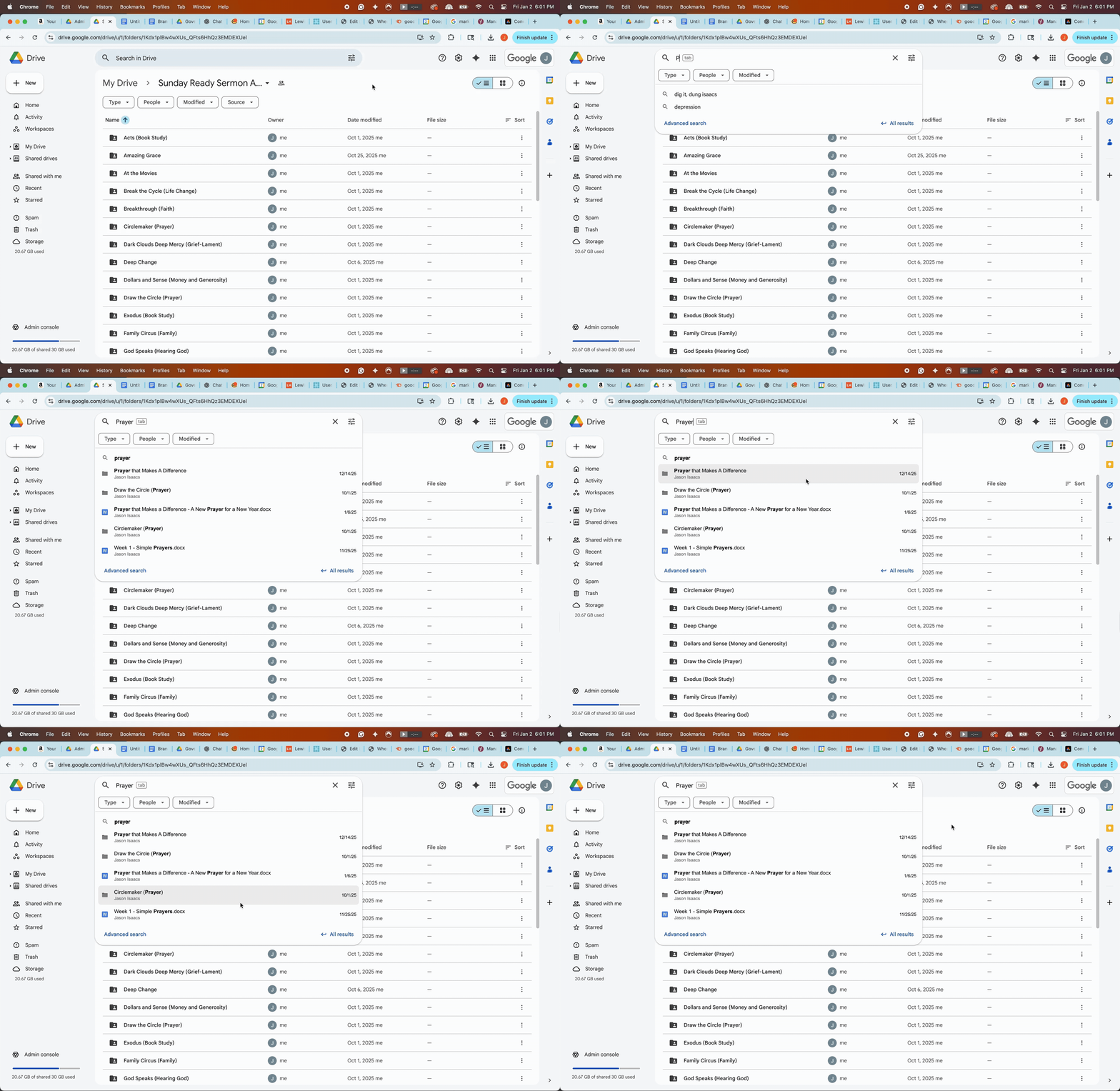
A decade in, I can search my Google Drive and instantly access years of stories, research, and illustrations. It’s the compound effect of consistent collection.

Word Search

Weekly preaching is already hard. Don’t make it harder by starting from zero every time.

Plan ahead.
Read deeply.
Collect faithfully.
Catalog consistently.

I promise you it will make the burden of weekly preaching easier, and your content will be better.

Stat Quote Story Form Head 1024x364

Preaching every week is hard

I send a free short email to pastors every Monday, with 1 stat, 1 quote, and 1 story you can use in your sermon. The goal is to help lighten the load of weekly preaching. Read a sample email.

The 5 Preaching Styles Every Pastor Needs To Know

After years in the pulpit, most of what we do as preachers becomes instinctual. That’s not a bad thing—but unexamined instincts can quietly push us to preach the way we were taught, not the way God actually wired us. Finding your preaching voice helps you stop fighting yourself in the pulpit and preach from a healthier, more authentic place.

How To Use a Preaching Calendar to Plan Your Year

Pastors carry the quiet pressure of preaching every week while juggling everything else ministry demands. It’s easy to feel behind or like your best ideas only show up when you’re already exhausted. In this post, I want to show you how to use a preaching calendar to reclaim your confidence and your margin. A preaching calendar helps you slow down, think ahead, gather better ideas, and preach from a healthier place. This guide will help you set a yearly rhythm that’s good for you, your family, and your church.